Audima Labs Sway Review
Long-Term Evaluation
Ladies and gentlemen, direct from Queensland, Australia, we bring you the Audima Labs Sway MIDI controller! If there’s one thing you can say about the Sway, it was perfectly built for social media. Well, you can certainly thank Jeremy Buckley for that, the young lad really knows how to show off The Sway’s Jedi power, the ability to control MIDI information simply by waving your hand above the unit.
The idea behind the Audima Labs Sway is actually pretty simple, and not exactly new. Instead of triggering notes and controlling effects by twiddling knobs, pressing buttons, touching pads or moving sliders, you move your hands through the air above the instrument. Infrared sensors detect those movements and translate them into MIDI data, allowing your gestures to play notes and chords, manipulate synthesizer parameters, trigger effects and introduce expression into a performance. We’ll get to some of the competing products in a bit. But first, let’s get the backstory.
The Sway began as a college side project between to mates, Isaac Jack and Jeremy Buckley, who studied engineering together. Buckley had been building small robots that could navigate indoor environments with ultrasonic distance sensors. Understanding how the spatial sensors worked, the pair wondered aloud if the technology could be employed to create a DJ controller. Their first prototypes used one sensor to control an effect on the X axis and another on the Y, something that other motion controllers could already achieve, so they decided to up the ante. They tried four sensors, then eight, then full XY tracking with 20 sensors before settling on the current count of 16 on the Sway. The concept was exciting enough that the two decided to form Audima Labs in March of 2023. But there was only one problem. They were two students without much of a bank account. So they hit up friends and family for $70,000 of seed memory to secure patents and buy a bunch of sensors. Then they decided to roll the dice and show Australia what they had.
The lads went on Shark Tank Australia without any actual sales. The episode was filmed in July 2024 and aired that November. The founders asked for $50,000 for 5 percent and accepted the same sum for 15 percent from Nick Bell. An Indiegogo campaign followed with a goal of $22,800. When it closed, 256 backers had pledged $220,958. Boom! The boys were really off and running and now need to actually deliver a real mass produced product.
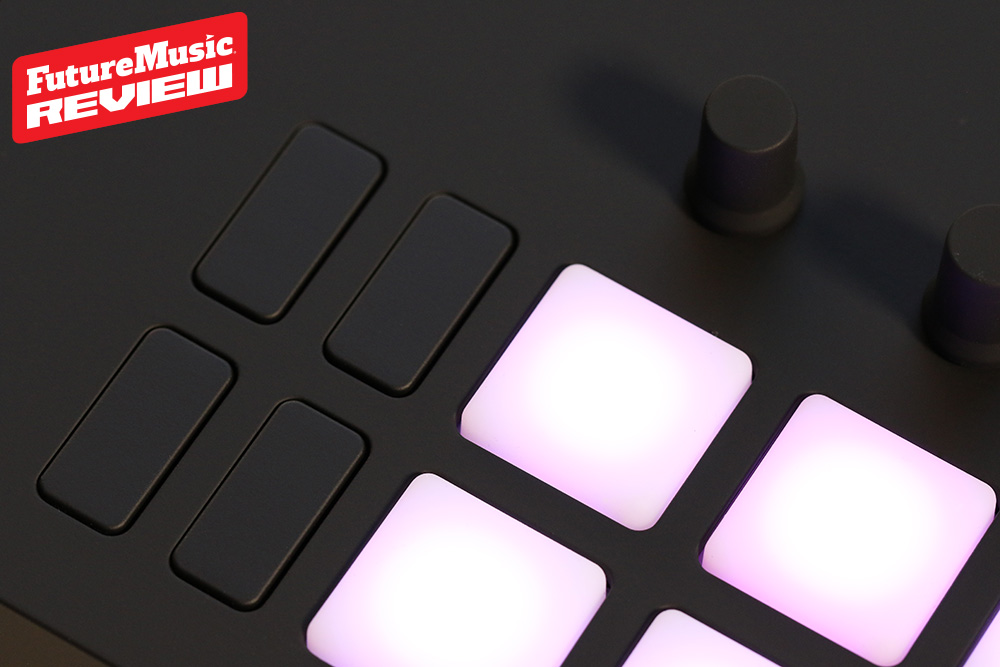
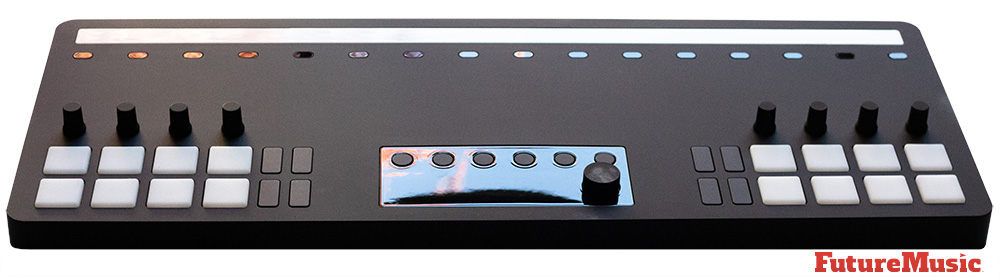
The hardware combines the motion tracking system with the performance controls you’re already familiar with, including eight rotary encoders, a 3.2 inch OLED display, 24 mappable pads, 8 buttons and 96 motion responsive LEDs. These non-motion controls provide Sway with a sensible foundation for pedestrian parameter changes, navigation and some triggering, but fall decidedly short in all categories, which we’ll get to in more depth later.
Of course, the main event is what Audima calls 6D Expression, which are more technique related dimensions than spatial. The Sway contains six gesture modes, Strike, Sway, Pulse, Glide, Press and Sculpt. Strike interprets the speed of a downward movement as velocity. Pulse uses vertical movement to introduce rhythmic modulation. Glide allows transitions between notes or chords. Press responds to the movement of the hand toward and away from the unit, and Sculpt uses a second hand to shape additional layers of expression.
The Theory Engine where scales, chords and octaves can be incorporated into custom gesture-controlled layouts is another big part of what Jack and Buckley wanted to offer musicians with Sway. There are 36 presets available, as well as the ability to create your own custom layouts, to configure MIDI mappings and save different setups for different projects or performances in order to organize musical zones in the controller’s airspace.
The Sway’s middleware, available for macOS and Windows, is where all the configuration takes place. It allows users to design layouts, configure note and chord regions, assign MIDI control changes and customize the physical controls. Audima Labs also provide downloadable projects, DAW setup instructions and MIDI remote scripts for supported versions of Ableton Live and Cubase. This makes Sway far more than simply a novelty device. Both Jack and Buckley wanted the device to have a level of sophistication that attempts to change the paradigm of not just what a controller can do, but how a musician can physically interact with music.
For this long-term review, we employed six different users: two electronic musicians using The Sway in their studios, two electronic musicians who used The Sway to performer their own material live, and two DJs. Their direct feedback are placed throughout this review in quotes below.
The Sway certainly isn’t the first controller to use motion to manipulate a musical instrument’s parameters…
Despite some of Audima Labs marketing claims, The Sway certainly isn’t the first controller to use motion to manipulate a musical instrument’s parameters. You can certainly cite the Theremin as the first mainstream use to hand positioning to that effect. And in the modern age you have Vince DeFranco’s Dimension Beam, which was an outboard MIDI controller put out by his company Interactive Light. In the late nineties, Roland purchased the technology and rebranded it as the D-Beam, which made its commercial debut in 1998 on the MC-505 and later turned up on the JP-8080, AX-7 and the HandSonic. This Is Noise’s MIDI Blaster also predates The Sway, and there are other examples, but Jack and Buckley have definitely driven the concept further than the others.
Lets get some of The Sway’s deficits out of the way first, so we can focus on the positive. First and foremost, every – single – one – of our reviewers “hated” the “low resolution” display that was “way too dim” to “register in any light condition.” Through four batches of the Sway’s production, it still hasn’t been replaced and should definitely be a consideration going forward since it’s “just awful.” The non-motion tracking controls also didn’t win any awards from our reviewers, and can be summed up as simply “serviceable.” They work, and Audima may have been limited in what they could achieve since they didn’t want any of the conventional controls to invade the motion sensor’s airspace, but the configuration was a “head scratcher,” at best. The small backlit pads also didn’t impress. They are not velocity sensitive and don’t serve much purpose beyond On/Off. They can inform on the Sway’s current state based on color, but so could the display, if you could actually see it. Plus, with the four On/Off oval buttons on the side, it’s somewhat redundant. As one reviewer summed it up, “if you want to provide standardized controls, then put them in a standardized format. What Audima Labs has done here is a miss and needs to be re-evaluated.”
The motion controller does have some perceivable latency. Certainly not a deal breaker when using it for effects or filter sweeps, but if you’re trying to play notes in a timed sequence with your hand, it can “be a tad wonky.” It doesn’t help that the note zones are undefined either, which may lead to the perception of latency as well. Thus, the note playing aspect is “better suited for more ambient and experimental genres.”
Audima Labs Sway Review
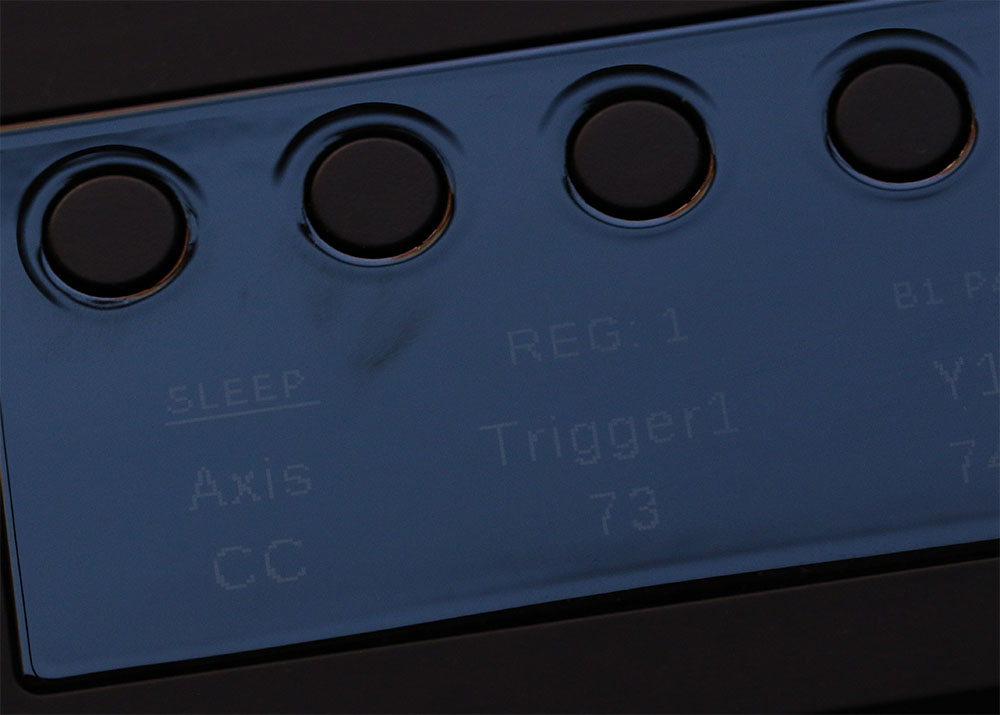
Finally, we come to Sway’s middleware application, which is “unwieldy” and “clunky” according to the majority of our reviewers. Sure, all of our evaluators were able to get around and perform the necessary tasks, but “it was clearly not designed by a true GUI pro.” It should be. The motion control hardware depends on it and it really should be a seamless process. Version v1.2, which premiered this past spring gave us two-handed note playing, customizable buttons and knobs, MPE support, automatic preset switching via Program Change, bug fixes and some minor desktop app improvements, but with nothing since, it doesn’t appear to be a top priority. Mapping is also janky, but we’ll get to that later.
Now let’s focus on what Audima Labs has achieved with Sway, namely taking something that others would charge as a gimmick and present it into a new yardstick of musical expression. It’s clear that these two Aussie lads gave the idea a lot of thought, and researched the market. With Buckley’s understanding of distance sensors, we understand that the ones he chose are off the shelf models repurposed for creating the different zones, but the concept of how the hands enter the zones beyond just waving and swiping is what makes the experience truly unique.

The Sway has been sold in batches since its inception. The crowdfunding round delivered about 300 units, the second batch at around 500 and the third at 1,200. Batch 4 pre-orders opened on August 18, 2026, with delivery estimated for November and December. The company reports that the Sway has been delivered to more than 35 countries.
What’s evident is that users have to spend quite some time learning how The Sway reacts to their particular hand gestures. It feels like some sort of trick since what Buckley demonstrates in his awesome videos is not what most users are experiencing in their own forays. This is evident by the Discord users group. We haven’t witnessed a single user video that even comes close to Buckley’s prowess on Sway. His choice of using Drum ‘n Bass tracks for his demos is brilliant, since that dynamic genre seems tailor-made for motion expression. Even DJs who have successfully mapped Sway to their software, an achievement in its own right, cannot equate Buckley’s technique.
Above the sensor strip, Sway divides the airspace into regions defined by the presets in the software. Layouts run from a single large region up to 3 x 4 for twelve areas, which is the current ceiling. There are also hybrid layouts that pair a note grid with dedicated XY, Y or dual Y modulation zones. Unfortunately, you cannot define your own layout, as evident by requests in the Discord group for even basic two XY zone layouts, which would be quite useful for modulation with two hands.
The latest update, version 1.2, was released at the end of April 2026. The most substantial update so far, it added two-handed note playing, MPE support, customizable buttons and knobs, automatic preset switching via Program Change, and a round of middleware improvements…
Each region runs in one of two modes. Instrument regions trigger a note or chord when your hand enters. Voicings include unison, major, minor, sus2, sus4, diminished and augmented, in root position or first or second inversion. Modulation regions convert hand position into CC data on any of the 16 MIDI channels. They can work as a single-axis fader, a two-axis XY pad, or a hybrid that sends a trigger CC on entry and then tracks height. With the Link Hands setting off, a second hand gets its own independent X and Y assignments in the same region. The Theory Engine ties it together. Choose a key and scale, and the app writes the correct scale notes across every region in one step.
Audima’s aforementioned six dimensions (6D) of expression reside on top of the regions. Strike sets velocity from how fast your hand drops into a region and needs no mapping. Sway turns a side-to-side shake into a rate-of-change value. Pulse sends a rising CC as you lift your hand after a note triggers. Press does the reverse, sending CC or aftertouch as you push downward. Glide is an MPE mode that gives each note its own channel, so a slide between regions bends pitch. Sculpt splits the work between your hands, one playing notes while the other modulates.
LinnStrument Sale
Roger Linn has put his LinnStrument on sale! (He never does this…) Learn More About LinnStrument
With the MIDI Blaster in retirement, the Sway’s biggest competitor right now may be the Embodme Erae 2, which coincidentally we subjected to a long-term review not too long ago. You can read our Embodme Erae 2 review, but essentially it’s a 402 mm by 277 mm touch surface built on 16,000 force sensors. It touts 100 µm XY precision, global latency under 1 ms, and a 42 by 24 RGB LED matrix. It also works standalone, with an eight-track looper, an arpeggiator, eight layouts, and support for MIDI 1.0, MPE and MIDI 2.0. Its connections include one MIDI input and two outputs on 3.5mm minijacks, a micro-SD slot, and 24 configurable CV, gate and trigger outputs. Layouts are built by dragging keyboards, pads and faders into place via the Erae Lab app, similar to Sway’s middleware app.
Both being innovative MIDI controllers, they do pull in opposite directions, but can be used together for a real hands on approach to electronic music. The Erae 2 is built for resolution. It gives your fingers a surface to push against, measures how hard you push, accepts a layout of nearly any shape and can basically morph into whatever you desire. The Sway is more confined, but does have the ability for true dramatic fanfare with exciting movements, such as a hand swipe that translates to a profound filter sweep, a gesture an audience understands without explanation. Which is why they can effectively work together in a marriage where the Erae 2 does the precise, structural work and The Sway supplies the spectacle.
That said, the extravaganza will cost you precision and independence. The Sway stops at 12 regions, while the Erae 2’s layouts are pretty much unlimited, being only constrained by finger size. The Sway has no looper, sequencer, arpeggiator or CV. Without a MIDI input, it cannot take instructions from other hardware unless a computer makes the connection. Embodme also publishes latency and resolution figures, and Audima publishes neither, which matters for a product sold on accuracy in airspace.
Mapping the Erae 2 is “much easier and reliable” than Sway, which is “cumbersome” and “takes a lot of patience” since the results “sometimes don’t stick.” In fact, you have to go through an annoying rigamarole moving back and forth from Sway to your software to make it work. Even Ableton, known for its insanely easy mapping methodology, was messy at best, despite Buckley’s solid video tutorial.
The Sway was featured in two live performances by our reviewers. In one case, Sway lost it’s mapping and decided to “take a holiday” right in the middle of the first set. Luckily the reviewer was able to do a full reboot of both the computer and the Sway and get it back online for the second set. But “deciding to take a dirt nap during a performance is certainly not what you want.” “If I ever take The Sway out for another performance, I’m definitely going to have a backup plan like a Push 3 at the ready.”
“If I ever take The Sway out for another performance, I’m definitely going to have a backup plan like a Push 3 at the ready.”
There is certainly a place for Sway in a DJ rig, but with the weird pad, button and knob layouts, you’ll pretty much only use the sensors for filter sweeps and effects. In addition, your mileage may vary with Traktor Pro, Serato, Rekordbox and VirtualDJ mapping and connectivity, even though they’re all class compliant. What both our DJs realized immediately is that the Sway is simply not plug-and-play. It takes hours of watching video tutorials and reading the manual, a lot of trial and error, then more research, then more trial and error and then a ton of patience. “This is not a device you connect to your computer and start jamming,” revealed one of our DJ testers. But don’t throw in the towel just yet.
Read Next: Telepathic Instruments Orchid Review
Judged as hardware engineering, the Telepathic Instruments’ Orchid is merely good. Judged as a songwriting tool, it’s excellent, and it would be genuinely outstanding if the next revision spent its effort on removing walls rather than adding rooms… Telepathic Instruments Orchid Review
“We’ll get this sorted…” is their go to approach and you won’t feel like you were ever abandoned during each step of your Sway journey…
Both Jack and Buckley are quite available for customer support, either through email or the Discord. “We’ll get this sorted…” is their go to approach and you won’t feel like you were abandoned during each step of your Sway journey. They clearly understand that Sway can be daunting to setup, and they want to ensure the company stands behind the product.
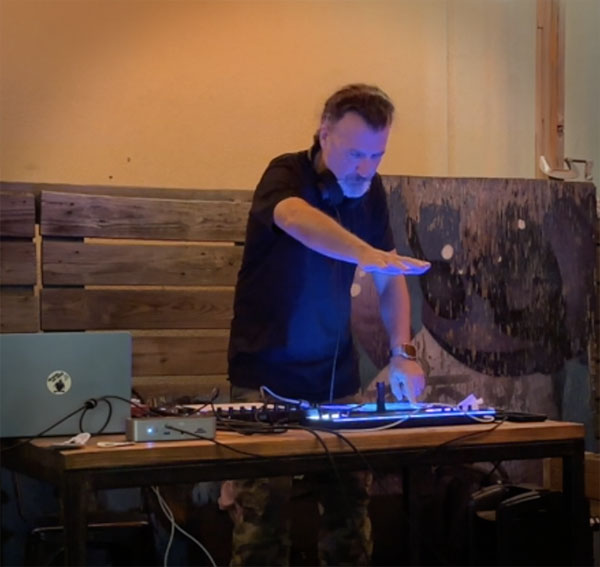
Two of our reviewers added Sway to their live performance rigs to test the MIDI controller in the wild with varying degrees of success. But when it worked, the crowd loved it.
Finally, we have to address the biggest elephant in the room, and that’s the price, It’s expensive. Understanding that most users will disregard the conventional controls and just use the motion sensors, you’re paying a lot of money for that sole feature. For some who want to add a new visual dimension to their performances, it will be a no-brainer, to others, they will find the Entrance Fee prohibitive. We provide a suggestion in our The Future sidebar below on how to address both issues.
Conclusion
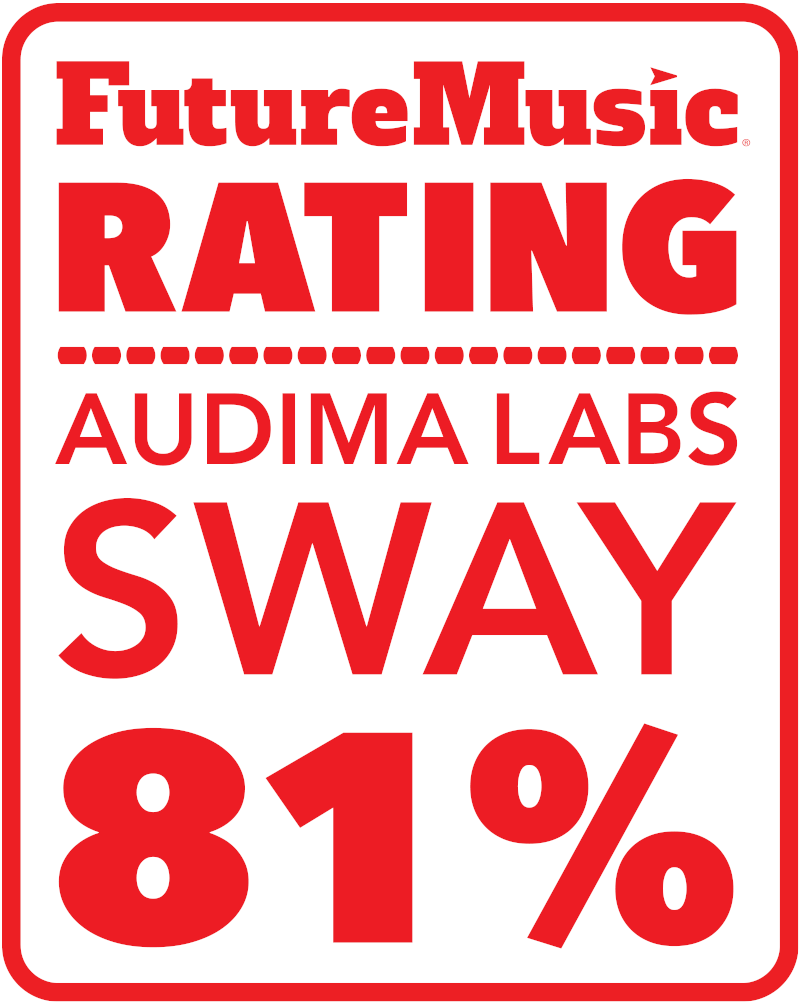
Of course, we have to salute Issac Jack and Jeremy Buckley for what they’ve accomplished with the Sway. For two young men to bring a product of this caliber to market is quite a feat. They also held up quite well to the scrutiny on Shark Tank when others would have folded, tuck their tails between their legs and shuffled away in obscurity. They both persevered, are clearly dedicated to making Sway something truly special, and have discovered a market niche that isn’t being addressed at the moment. That said, this isn’t a polished product that you can take home and it will just work precisely how you imagined. In fact, it will probably never work for you the way it does in Jeremy’s enticing videos. But if you have the aptitude, dedication and patience, you can certainly add it to your rig to provide a “magical dimension to your performances.” Worth A Look.
Audima Labs Sway costs $830 or $615 if you reserve before the next batch.
Price Note: Prices are as of October 2026, quoted in US dollars and are different in other countries and geographical locations.
Connectivity — Connections are a TRS-A MIDI Out (with no DIN adapter included), a power-only USB-C input, and a USB-C host port that carries both data and power. The Sway is class compliant and needs no drivers on macOS, Windows 10 or later, or Linux. The editor runs on macOS, in Apple Silicon and Intel builds, and on Windows. Audima provides remote scripts for Ableton Live 10, 11 and 12 and for Cubase, plus demo projects for Live, Logic and the free Vital synth. A DAW can switch the Sway’s presets with Program Change messages, and two reserved messages put the sensors to sleep and wake them again.
Cheers:
+ Paradigm changing MIDI motion controller
+ Theory Engine writes scales and chords across all regions
+ Six gesture types, including automatic Strike velocity and MPE Glide
+ Two-handed note playing and independent second-hand modulation since v1.2
+ 36 onboard presets with Program Change switching and remote sleep
+ Class compliant, with remote scripts for Ableton Live and Cubase and demo projects for several DAWs
+ Strong customer support via email or Discord
Jeers:
— Steep learning curve
— No MIDI In, looper, sequencer or CV
— Cannot be run standalone
— Fiddly and tiresome manual mapping with frequent CC bookkeeping
— Push-based editor with no live editing
— Long firmware update process, with a manual driver step on Windows
— Drum pads are not velocity sensitive
— Conventional controls are unconventional
— No published latency or resolution figures
— Available only in batches, with waits of several months
— Manual has no specifications and contains inconsistencies
— “Awful” dim display
— Software Workflow could be a lot better
The Future: This may be a tough pill to swallow for Audima Labs, but the first thing they need to realize is that the current selection of conventional controls (pads, buttons and knobs) come up wanting. Our suggestion? Get rid of them. The core competency and value of Sway is the motion sensors, not the physical controls. Our speculation is that when they designed Sway, Jack and Buckley felt that either there were these big, blank spaces surrounding the display and it “needed something” to go there, or they may have felt that a few physical controls would be beneficial. Either way, they don’t work well, and if you watch user videos, no one is using them. Just bid them adieu.
If you do feel compelled to keep them, then set it up as proper DJ controls: clickable rotary knobs for Hi, Mid and Lo EQ, clicks for Hi Cut, Mid Cut and Low Cut; another knob for Pan, two more buttons for Mute and Solo, or Stop and Play; and a slider for volume. Want to keep the pads? Instead of just replicating the same config on both sides, set up a 3×3 grid of larger velocity sensitive pads (MPE would be a bonus) on one side and the controllers on the other. Now this layout would work with both musicians and DJs in 90% of performance scenarios. But again, this isn’t why people are buying Sway.
With all the money you’re now saving on the ditched components, you can now invest in a quality display. The current one is just awful and can’t be seen clearly in low-light environments.
Finally, the usability of the middleware needs to be addressed; it could simply be a lot better. Someone with a lot of GUI experience should be considered for a complete revamp.
Off The Record: Our anticipation to review the Sway was off the charts watching Jeremy work his magic. Fact it, every single one of our reviewers wanted to just love it, but in fairness to our readers, we had to be dead honest about its shortcomings. Jack and Buckley have definitely moved the needle as far as MIDI motion controllers, and we hope they can continue charting new territory in this area, but they need to take a hard look at the current state of affairs and make some savvy adjustments.