Ableton has announced that Live 13 will be released in early 2027. The upgrade features ARA 2 support, a new step sequencer, expanded racks, new devices, and tools for mixing and sound design.
Ableton is really doubling down on their Push Instrument controller with the ability to customize Push’s pad surface, as well as several new workflow enhancements. Combine and arrange your choice of elements including note areas, Session View, faders and expressive XYZ controls, and map them to tracks and parameters anywhere in your Set. Each layout can take whatever form your Set calls for: a compact solo performance setup, a surface for playing an instrument with one hand while launching clips and shaping effects with the other, a grid of expressive controls for modulating several sounds at once, or something else altogether.
Ableton Live 13

The easiest way for electronic musicians to get their music onto Spotify, Apple Music, iTunes, Amazon Music, Tidal, Instagram, Facebook, TikTok, Pandora, Twitch & much more! Click the banner above or the Go Button to save 7% off of your signup! GO!
Live 13 claims to expand how musicians and producers can create and reshape audio and MIDI. Here are some highlights:
» ARA 2 Support – Work with ARA 2 plug-ins directly in Live for faster, more advanced audio editing. Correct pitch and timing, handle post-production, or reshape audio in unexpected ways without leaving Live. Live 13 Suite includes Melodyne Essential for precise audio tuning and timing edits.
» Step Sequencer – A playful new way to create MIDI patterns in Live. Build a beat or melody in a few clicks, create evolving polyrhythms with independent row lengths and playback settings, and add variation with per-step velocity, chance, repeat, and pitch bend.
» Capture Automation – Tweak knobs, press buttons or move controls as you explore, then press Capture to turn your gestures into automation you can edit and develop into longer, expressive phrases.
» Contextual Browsing – Load devices or swap presets directly from the device chain, so you can work fast and stay with the sound you’re building. Using new clickable controls and keyboard shortcuts, you can create complete Instrument Racks and effects chains without opening the main Browser or even moving the mouse.
Sequence in ways that change what you make. Live 13’s new Step Sequencer takes on a physical, playable form on Push 3, where beats and melodies can loop, overlap and unfold in unexpected ways…
» Drum Synth – Design percussion directly with controls made for musical results across their full range. Dial in classic drum machine hits, sculpt physically modeled percussion, or explore the in-betweens with more experimental engines.
» Looplet – A Max for Live device for Live 13 Suite that uses four playheads to layer and loop different parts of a single sample. Capture audio directly into Looplet and create ambient textures, tape-style gestures, granular glitches and drones that stay loose, grid-free, and playable.
» Rack controls and mapping – Expand your favorite Racks and assign up to 32 Macros as remote controls or modulators, with customizable curves for each mapping. Reorder Macros, add buttons for on/off controls, and create mappings by drag and drop. Plus, cycle notes through chains in Instrument and MIDI Effect Racks with Round Robin.
» Envelope Clips – Add automation or modulation to effects on Return tracks. Set different device parameters per scene and trigger instant effect changes in Session View, modulate effect parameters with looping clips, or combine with Follow Actions and unlinked envelopes for less predictable results.
» Multiband and Mid-Side Racks – Multiband Racks let you apply effects to specific frequency ranges using different filter types including linear phase filters, while Mid-Side Racks let you process the center and sides of the stereo field independently. Balance competing elements, control width, and make room for the details of your mix.
» Clipper and Transient Shaper – Take control of dynamics with two new audio effects for Live Suite. Add punch, soften attacks, and tighten or bring out tails with Transient Shaper. Use Clipper to control peaks, push your mix louder, or introduce harmonic distortion.
» New Core Library presets for mixing, mastering, and vocal production – New effect presets, Racks and templates offer ready-made starting points for vocal and guitar production, mixing and mastering.
» Device Slots and other Mixer improvements – Device Slots give you a clear overview of the devices on each track, directly in the mixer. Toggle, reorder and try new combinations without stepping through tracks individually. Other refinements include compact Send sliders, quicker control over which sections are shown, and smoother mixer resizing.
» Classic Dynamics & EQ Pack by Softube – Five Max for Live audio effects for Live Suite, modeled by Softube on sought-after studio hardware and ready for hands-on control with Push. Control dynamics, carve tone, and add warmth with FET and optical compression, British console EQ and compression, and analog-style drive.
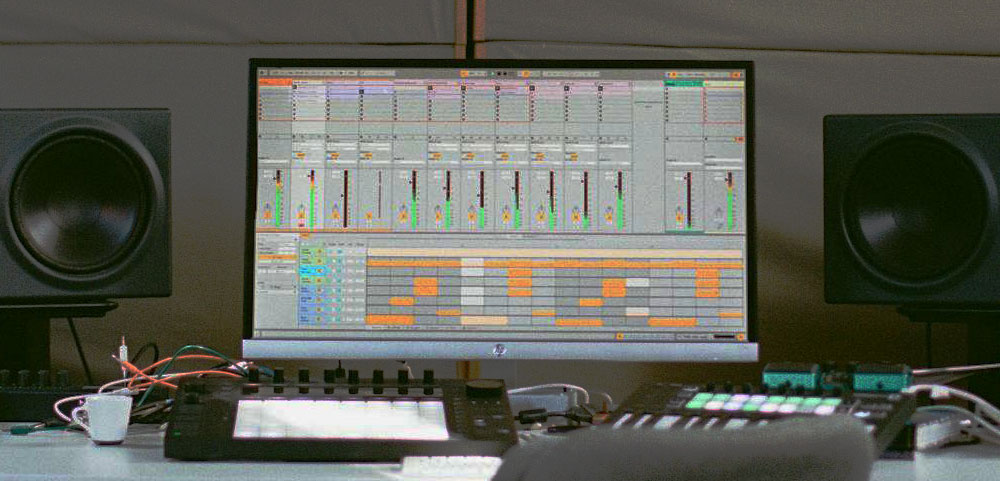
As stated earlier, the Push controller gets a lot of attention in this new upgrade. Here are some other enhancements:
» Performance Mixer – Play the mixer as an instrument in its own right. Designed for DJ performances, dub-style improvisation and more, Performance Mixer places Session View above touch-responsive pad faders, giving you fine control over individual levels while keeping several tracks within reach. Launch clips and scenes, make sharp cuts and ride sends with both hands.
» New Step Sequencer – Sequence in ways that change what you make. Live 13’s new Step Sequencer takes on a physical, playable form on Push 3, where beats and melodies can loop, overlap and unfold in unexpected ways. Give each pitch row or Drum Rack pad its own sequence length and playback settings to turn simple patterns into evolving polyrhythms. Use Expressive Step Editing to adjust velocity, chance, repeat and pitch bend on individual steps, or sweep across multiple pads to make sounds swell, drum rolls accelerate and melodies bend.
» Device Mode Upgrades – Craft complex Racks and work on every layer of a sound without leaving Push. Use the jog wheel to move smoothly through devices, parameter banks and nested Rack chains, and experiment with Drum Rack returns and pad routings for the first time on Push. Expand your Racks with up to 32 Macros and use Macros as modulators. With Live 13’s new Multi-Band and Mid/Side Racks, process specific frequency bands or the mid and sides separately.