iZotope FXEQ Plug-In Review
In for review is iZotope’s new plug-in for Mac and PC, FXEQ. The idea is simple. Create a plug-in that can effect specific frequency bands with individual effects, including Saturation, Reverb, Delay, Modulation and Lo-Fi. Now to be clear, this is nothing new and you can certainly set this up in your DAW using a multiband EQ and individual effect plug-ins. But, that puts a nice tariff on your CPU processing fund, and it’s quite cumbersome switching back and forth to find your sweet spot. iZotope’s FXEQ solves this problem with a glorious interface, low CPU tax and quality effects to enable you to explore new realms of sound design.

For a limited time only! Up to 80% off all Waves Bundles. PLUS click the banner above or the Go button for an additional 10%! This is Waves best deal yet! Get yours today before this special ends! Go!
FXEQ is the latest installment of iZotope’s Catalyst series that offers focused plug-ins to address specific tasks. Featuring sophisticated interfaces that don’t require any manual diving, it’s a fresh and modern approach to processing that Ozone, Neutron and other iZotope products can certainly learn from. The other plug-in of this series Aurora, Plasma, Velvet and Cascadia all have GUI’s derived from the same DNA, and if you work with vocals, we certainly think Velvet is worth a look, but FXEQ sets a new high watermark for Catalyst graphic user interfaces.
The other plug-in of this series Aurora, Plasma, Velvet and Cascadia all have GUI’s derived from the same DNA, but FXEQ sets a new high watermark…
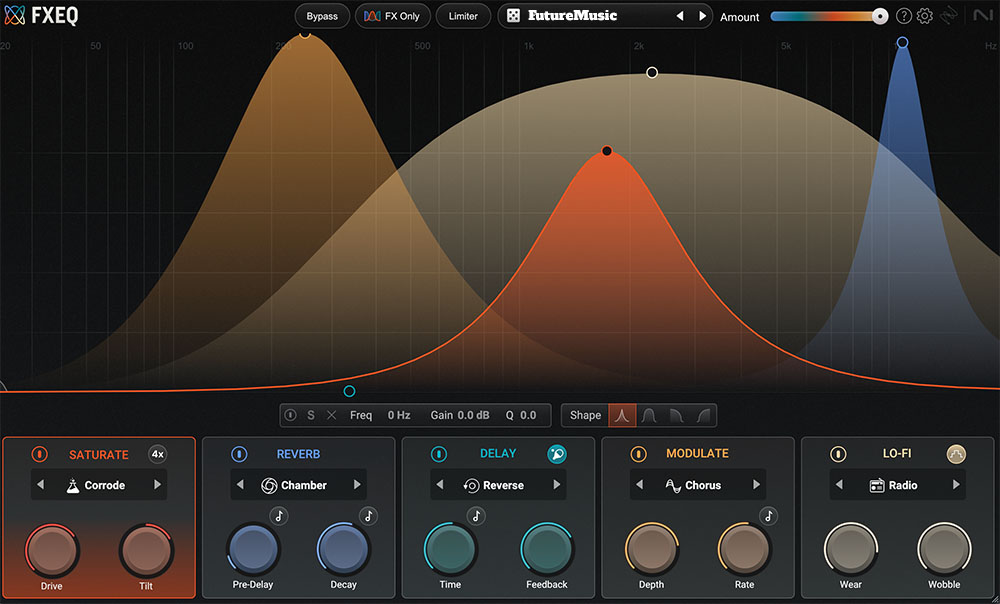
iZotope’s use of pastel colors on a black background in FXEQ set the perfect vibe for selecting one of the five color-matched effects. For example, Saturate is depicted with a rust colored shape in the spectrum matched with rust colored controls on the bottom. Again, this is not groundbreaking, but the execution couldn’t be better. Along with the four filter shapes and adjustable Q, you can adjust the gain and frequency manually if you want to dial in something very specific. Otherwise you’ll just use the savvy nodal points and handles on the curves themselves to make your adjustments. Another nice touch is the horizontal wet/dry slider along the top. This is actually an important component, which we will discuss later in the review.
Each effect has different modes to select from and then the ability to dial in two different attributes. For example, Saturation has eight different modes, Satin, Tape, Grit, Foldback, Snap, Bump, Steel and Corrode. All eight have two dials, Drive and Tilt, which provide additional adjustments with Tilt allowing for tweaking modulation. Lo-Fi’s modes include Vinyl, Tape, Cassette and Radio with Wear and Wobble attributes. For sound design, we were hoping that the degradation would have been more severe. The Reverb has Hall, Chamber, and Plate with Pre-Delay and Decay modes. You can adjust the Pre-Delay and Decay based on note divisions or milliseconds. We liked the quality of the reverb and it really shines when you target very specific frequencies to add a sweet shimmer.
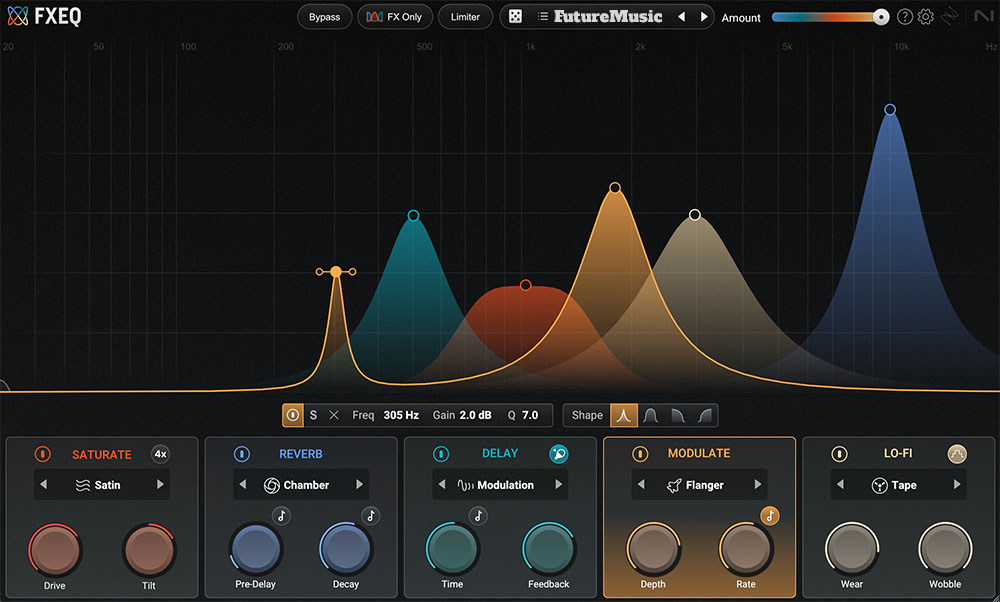
Delay’s modes include Classic, Reverse, Modulation and Crunch with time (milliseconds or note divisions) and feedback controls. Ping-Pong, activated by toggling the Paddle Icon, is also available and works wonderfully with the Modulation mode when you want to get weird and experimental. Reverse was our least favorite, but Crunch, which adds a nice, but not over-baked, distortion was quite effective on synth and guitar material. Finally we come Modulation, which includes Chorus, Phaser, Flanger and a Doubler. Just awesome how you can dial in the Flanger and Phaser for certain frequencies, providing a more subtle approach. Instead of your material just swimming in primordial soup of a Phaser or getting waterboarded by Flange, you can add just the right touches to your source material. Doubler was the least effective, but spotlighting frequencies with Chorus was a pleasant surprise to bring out a variety of different flavors and tones.
Even better, all this exciting action can be automated in your DAW allowing your source material to evolve over time. Pads can swell with shimmer while the delay builds in the middle frequencies – all while the bottom becomes more and more saturated. But it gets better, running FXEQ only added about 3-5% to our Ableton Live’s processing burden on our multicore Mac. That’s a huge savings compared to achieving the same thing running individual tracks with separate EQ and processing.


MIDI Designer Is Now Free!
MIDI Designer Pro X is now free to download! MIDI Designer Pro X is a professional-grade MIDI controller platform for iPhone, iPad and Mac. User-contributed layouts let you control everything from Ableton to Yamaha out of the box. Go beyond hardware and express your musical vision. Check out out now!

Don’t Overdo It!
The only thing that you have to watch out for is overdoing it. It’s so enticing to keep adding effect upon effect upon effect. You really have to be careful, but that’s where the Wet/Dry slider comes in so handy. Without resetting everything you’re developed, you can simply swipe left to see if you’re going overboard. Another nice touch is the Limiter button to prevent clipping. That said, if you need to add a limiter, it may be a sign that you may want to tone it down a bit. We tested a pre-release version of FXEQ, which did not include any of the available presets, so we can’t speak to their quality. However, with an interface this fabulous and the fun we had creating our own effect chains, we’re not sure that’s even a selling point.

The easiest way for electronic musicians to get their music onto Spotify, Apple Music, iTunes, Amazon Music, Tidal, Instagram, Facebook, TikTok, Pandora, Twitch & much more! Click the banner above or the Go Button to save 7% off of your signup! Go!

iZotope FXEQ Features:
- EQ-style interface: six-band EQs for each effect, with four filter shapes.
- Saturate: Eight saturation modes
- Reverb: Three reverbs for adding space and colo
- Delay: Four delay types to add dimension and stereo intrigue.
- Modulate: Chorus, Flanger, Phaser and Doubler modes.
- Lo-Fi: Four tame lo-fi styles to give your audio some vintage vibes.
- Limiter: A zero-latency limiter to prevent clipping.
- Wet/Dry Slider to see if you’re over-baking it.

Polyend Synth Review
FutureMusic spent considerable amount of time with Polyend’s new digital synthesizer, which they simply dubbed Synth, for this long-term review. Read our comprehensive Polyend Synth Review to find out more!
Conclusion
Easily the best Catalyst plug-in to date and ton of fun to use. It sounds great, automating a single sound source over time could send the Ambient / Soundtrack crowd into a tizzy, and a great sonic weapon to add to the quiver. Best part? It’s only fifty beans. Highly Recommended.
iZotope FXEQ Rating 92%
Cheers:
+ The Interface
+ The Interface
+ The Interface
+ Sound Quality
+ Quality Of Results
+ Fully Automated
+ Big Value
+ Low CPU Hit
Jeers:
– Lo-Fi Could Be More Lo-Fi
– Reverse Gets Muddy, Fast
iZotope’s FXEQ costs $49 / €49.

The Future: Would love to see the Lo-Fi get really wonky in a future firmware update; it’s too tame. The Reverse Delay would benefit from a gate to get it to hit harder. Whoever designed the interface needs a raise, like immediately.