HeadRush VX5 Auto-Tune Pedal Review
Auto-Tune has officially left the studio and hit the stage thanks to Headrush. For years, touring pros have shelled out thousands on playback rigs and plug-ins to keep their vocals pitch-perfect on stage. Enter the Headrush VX5 Auto-Tune, a rugged, gig-ready vocal processor promising studio-grade tuning and intelligent harmonies in a single stompbox. But does it actually deliver for working musicians, or is it just hype?

For a limited time only! Up to 80% off all Waves Bundles. PLUS click the banner above or the Go button for an additional 10%! This is Waves best deal yet! Get yours today before this special ends! Go!
The Headrush VX5 Auto-Tune packages real-time pitch correction, intelligent harmonies and effects into a single stompbox aimed squarely at gigging musicians. It’s surprisingly compact, well-made and quite easy to use. The downside is that a few interface and workflow limitations keep it from being the polished, one-button solution Headrush probably wanted to debut.
Let’s face it, every singer drifts off pitch now and then (yes, even you dear reader).
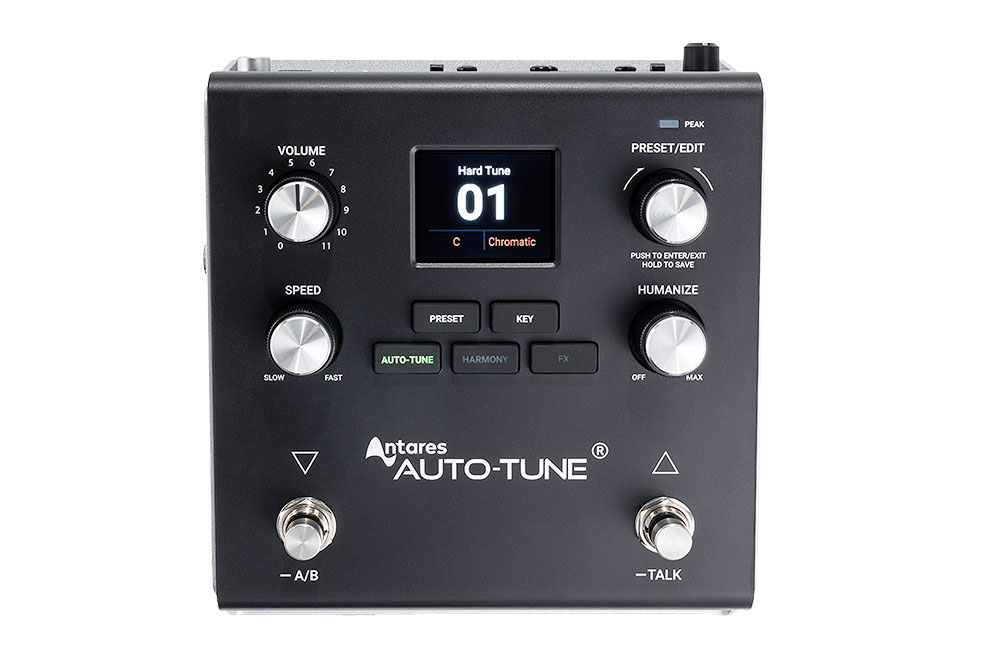
The hardware immediately tells you this is built to survive late nights and sticky stages. The metal chassis feels weighted and the tasty knobs with rubberized outer rings have a great feel. The footswitches give a satisfying, decisive click. A small, clear color display and dedicated buttons keep most navigation one or two clicks away — a welcome change from deep, mindboggling menus on recent pedals. The VX5 comes with a USB-B cable, power supply, and a quick-start guide that’s actually quite poor.
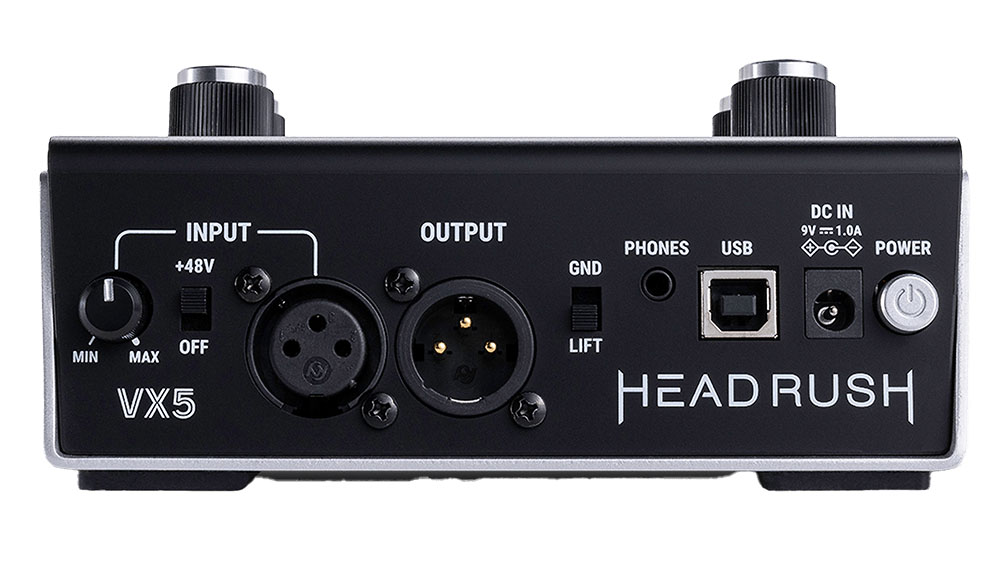
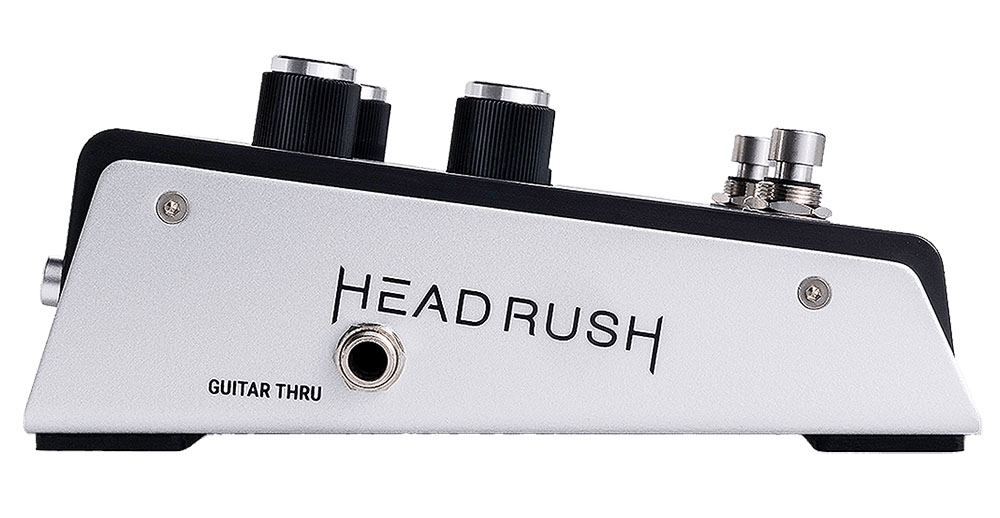
The VX5’s I/O contains a XLR mic input with gain and phantom power, guitar input/through for harmony tracking, balanced XLR output for the PA, a headphone jack for silent practice and monitoring, and USB-B for firmware updates and MIDI control. The pedal ships with 99 prebuilt presets and 150 empty slots for user patches.
There are competing pedals that offer correction, notably the TC Helicon Voice Live, but users of that solution are divided on the outdated pitch correction algorithm, even though the TC’s vocal effects have a fanbase. In fact, the VX5’s other competition is actually from their flagship Prime Guitar Modeler, but this pedal is a dedicated vocal processor created solely for live performance.
All three of our evaluators, a singer/songwriter, guitarist/backup singer and a sound designer found that the VX5’s output sounded noticeably different on the pedals main output than it did with headphones or in-ear monitoring. It was difficult to evaluate what’s actually transpiring here, but apparently there is a Ghost In The Machine. The takeaway is that what you hear in your headphones or monitors may understate how pronounced the tuning and effects are in the venue.


MIDI Designer Is Now Free!
MIDI Designer Pro X is now free to download! MIDI Designer Pro X is a professional-grade MIDI controller platform for iPhone, iPad and Mac. User-contributed layouts let you control everything from Ableton to Yamaha out of the box. Go beyond hardware and express your musical vision. Check out out now!
The VX5 has a wide range of correction and can go from full-on T-Pain/Cher style hard tuning to something so subtle it’s almost unnoticeable. The first preset demonstrates this quite effectively with Retune set to 0 ms and Humanization at 0% for that hard-tune effect. Conversely, softer presets use longer retune times and more humanization to preserve natural pitch fluctuation. Presets range from subtle (soft/warm tune) to aggressive (hard tune, mega).
The VX5 has a wide range of correction
Harmony modes include octaves, fifths and more complex arrangements. Many singer/songwriters on a guitar or piano will set the harmony source to instrument so the pedal follows your chord changes in real time. However, both our vocalists found that this didn’t always work as advertised, resulting in strange artifacts.

The easiest way for electronic musicians to get their music onto Spotify, Apple Music, iTunes, Amazon Music, Tidal, Instagram, Facebook, TikTok, Pandora, Twitch & much more! Click the banner above or the Go Button to save 7% off of your signup! Go!
Upon further use, our users determined that the intelligent harmony feature works well when the instrument input has a clean, loud signal with less complexity, while weak input levels reduced tracking fidelity substantially. Also, the harmony intelligence only applies to harmony voices. The auto-tune itself must be set manually to the correct key, which means you have to futz around with the pedal between songs.
Harmonization may be the VX5’s true calling
That said, the Harmonization may be the VX5’s true calling. While it has a very modern, pop sound, our backup singer tester thought it was good enough to be employed in his band to bring more depth and widen the soundstage. Buskers, who use a looper, may also get a lot of mileage out of the Harmonization.
VX5 Balanced XLR Input:
- Frequency Response: 20 Hz – 20 kHz (+0.2 dB)
- Dynamic Range: 111 dB (A-weighted)
- Signal-to-Noise Ratio: 110 dB (1 kHz, +4 dBu, A-weighted)
- THD+N: 0.003% (1 kHz, +4 dBu, -1 dBFS)
- Preamp EIN: -133 dBu (max gain, 40 ? source, A-weighted) / -127 dBu (max gain, 150 ? source, unweighted)
- Max Input Level: +10 dBu
- Sensitivity: -46 dBu
- Gain Range: 59 dB
- +48V Phantom Power
VX5 Main XLR Output:
- Frequency Response: 20 Hz – 20 kHz (+0.2 dB)
- Dynamic Range: 113 dB (A-weighted)
- THD+N: 0.001% (1 kHz, -1 dBFS)
- Maximum Output Level: +20 dBu
- Output Impedance: 100 Ohm
- Ground Lift Switch
VX5 Guitar Input (Balanced TRS/TS):
- Frequency Response: 20 Hz – 20 kHz (+0.2 dB)
- Dynamic Range: 111 dB (A-weighted)
- Signal-to-Noise Ratio: 110 dB (1 kHz, +4 dBu, A-weighted)
- THD+N: 0.003% (1 kHz, +4 dBu, -1 dBFS)
- Max Input Level: +13 dBu
- Input Impedance: 1 M Ohm
- Sensitivity: -46 dBu
- Gain Range: Same as HG04
Polyend Synth Review
FutureMusic spent considerable amount of time with Polyend’s new digital synthesizer, which they simply dubbed Synth, for this long-term review. Read our comprehensive Polyend Synth Review to find out more!
The VX5 organizes effects into five categories: Compressor, Flavor, Chorus, Reverb and Delay. Compressor types include Soft, Mild, Hard and Crunch, and each effect has a mix control. Flavor contains character effects: Sizzle (an Exciter), Megaphone, Radio, LoFi, Tube and Zinger. The vocalists felt that the Chorus was serviceable, but something they often left off, while our sound designer jumped on this effect to achieve some interesting results. The Reverb offers room choices ambience, but our vocalists found themselves turning the mix level way down. Delays are measured in milliseconds and the VX5 doesn’t offer tap-tempo or tempo-sync via MIDI, which makes musical synchronization less convenient on stage.
Building a vocal preset is quite straightforward. Simply pick a tuning (default is the key of C), set the Retune (20-25 ms is a good start), Humanization to (20-25 ms) for a more natural effect, add a Soft compressor, a modest Flavor attribute and a subtle reverb. From this foundation, you can then tweak the controls to achieve the precise action you desire. Our Singers found that they would use this as a Template Preset and then copy and paste it to a new location to explore the modulators in different ways. There’s only one downside.
You cannot enter sharp or flat symbols when naming a preset via the rotary encoder. In addition, if you want to change the key you have to do it per preset; you can’t just change the key on the fly like you would in the plug-in version.
- No tap tempo / tempo-sync for delays — timing is ms-based only.
- No sharp/flat input when entering key names in presets.
- Intelligent harmony depends on solid instrument input levels; autotune key changes must be handled per preset (or via MIDI program changes).
- Some behaviors and rough edges feel like it was released prematurely.
For adventurous live vocalists and small touring acts, the VX5 is an exciting tool and a practical alternative to expensive racks. For perfectionists who need flawless, on-the-fly key changes and tempo-synced FX, it’s worth waiting for future firmware refinements.
Conclusion
The Headrush Autotune VX5 represents an important step forward for everyday gigging musicians. It takes features once reserved for expensive playback rigs, like real-time pitch correction and intelligent harmonies, and delivers them in a portable, stage-ready package. The hardware feels solid, the workflow is intuitive, and the potential is undeniable. Still, quirks and a few performance hiccups suggest it’s not quite a finished product. For vocalists willing to be early adopters, the VX5 offers a glimpse of the potential live auto-tune can be in the future. For everyone else, it’s worth keeping an eye on, because with a few updates, this pedal could become an essential part of the modern live setup. Worth A Look.
HeadRush VX5 Auto-Tune Rating 81%
Cheers:
+ Build Quality
+ I/O
+ Phantom Power + Gain
+ Processing Power
+ Interface
+ Harmonization
Jeers:
– Weird Audio Difference Between Main Output and Headphones
– Can’t Sync MIDI
– Guitar Chord Follow
– Reverb Overbaked In Presets
– Can’t Define Sharps or Flats in Preset Names
– Zinger
– Manual
HeadRush’s VX5 Auto-Tune costs $299 / €299.

The Future: Clearly the VX5 was not ready for its closeup. Hopefully some significant firmware updates can right this ship.